For bug reports
Record the bug once, and the steps to reproduce write themselves
A bug is easier to show than to describe. Record the screen while you reproduce it, say what you expected, and send the link. Blyp zooms in where you clicked, and once the take has captions it writes the notes: each bug with its steps, expected and actual, as checkboxes the engineer can tick from the same page.
From what you said to a list they can act on
…
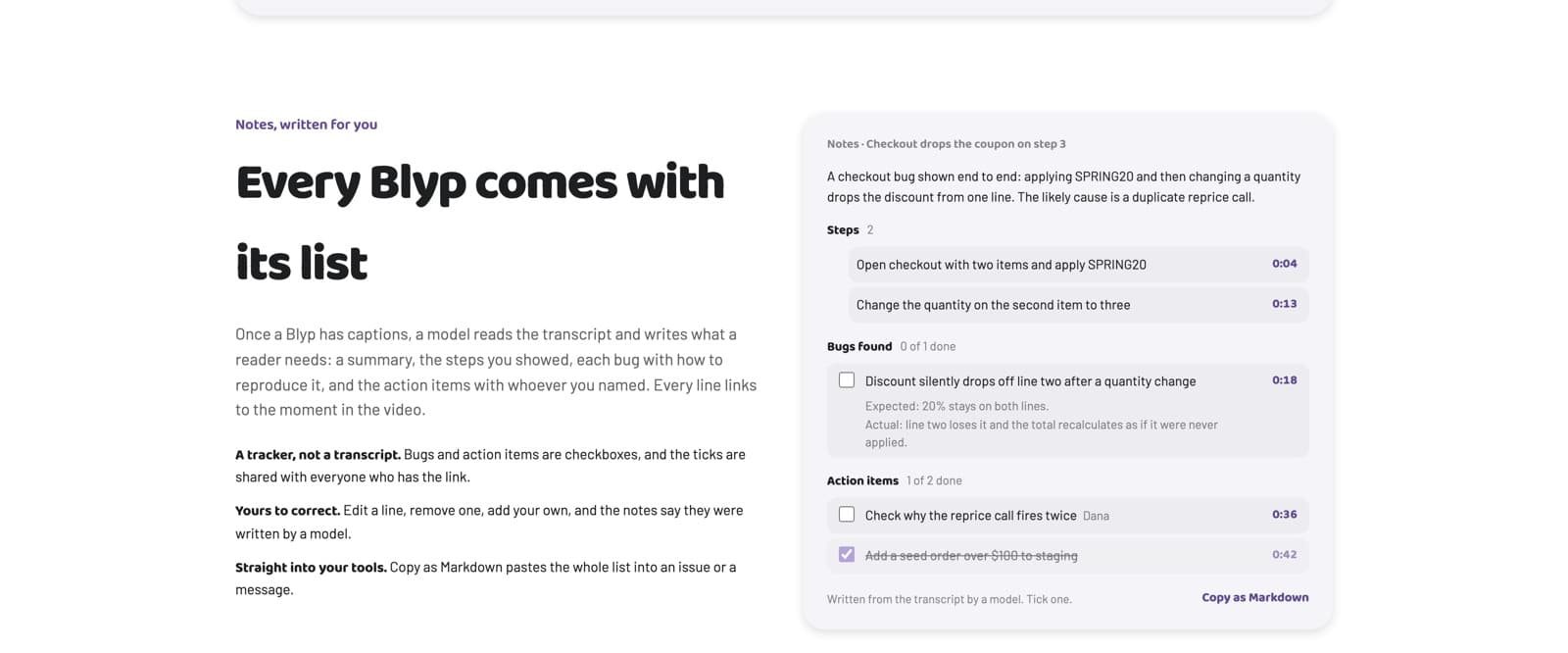
The reproduction, as a list
The notes turn what you showed into steps, each linked to the second in the video where it happens. A bug gets its own entry with how to reproduce it, what you expected and what happened instead. The engineer clicks a step and the video jumps there.
A tracker, not just a video
Bugs and action items are checkboxes, and the ticks are shared with everyone who has the link. A report with three bugs becomes a small board of what is fixed and what is not, without anyone creating an account.
Straight into the issue
Copy as Markdown pastes the whole list, summary, steps, bugs and action items, into GitHub, GitLab, Jira, Linear or a message, with the link back to the Blyp. You can edit or remove any line first, and the notes say they were written by a model.
Your clicks become the zooms
With the Blyp extension for Chrome, every click you make while recording is logged and turned into a zoom keyframe, applied when the video plays. The engineer sees the exact field, button or row, at full resolution, without you editing anything. Recording from blyp.link without the extension also works, and zooms can be added in the editor by hand.
Hide what should not be seen
A password, a customer's name or an API key that was on screen can be blurred or blocked out afterwards, on the same link. The video plays only inside the Blyp page, so a copied file address does not play elsewhere, and a revoked link stops within seconds. Pro adds password and expiring links.
Long reproductions welcome
There is no recording time limit on any plan, so a bug that takes twenty minutes to reach is recorded in one take. Free holds up to 10 Blyps at a time with 5 GB of recording a month, and writes captions and notes for 10 Blyps a month.
Questions
Does the engineer need an account to watch?
No. The link opens in any current browser with no account and no sign-up wall. They can tick the checkboxes, comment at a moment, and read the transcript.
How do the notes know what the bug is?
From what you say. Once the Blyp has captions, a language model reads the transcript and writes the summary, steps, bugs and action items, each linked to the moment it was said or shown. Say what you expected and what happened, and it lands in the notes. You can correct any line.
Can I paste the report into GitHub or Jira?
Yes. Copy as Markdown puts the whole list on your clipboard, with the link to the Blyp, ready to paste into an issue.
What if the recording shows something confidential?
Blur or block out the area in the editor; the change applies to the link you already sent. Revoke the link and it stops within seconds. On Pro a link can also have a password or an expiry.
Is there a time limit on a bug report?
No, on any plan. Record for as long as the reproduction takes.
Try one take.
Sign in with Google, reproduce the bug on screen, and send the link. Free, no recording time limit.